Proxy Shop
General Information
Proxy Shop allows you to purchase proxies directly in Octo Browser without having to search for external services. In just a few clicks you can select the desired provider, purchase proxies, and add them to your profiles.
- Built-in proxies are not counted towards the Proxy Manager limits.
- Proxy Shop is available on all subscriptions, including promotional subscriptions.
- Once your Octo Browser subscription expires, you cannot create a proxy even if you still have unused traffic left.
Proxy Types
Currently, Octo Browser supports residential proxies from all providers and mobile proxies from Hive Proxy and Nodyx. Nodyx also offers residential and mobile proxies with UDP support.
Residential proxies are IP addresses that belong to real devices and are issued by ISPs to real users. They look like common IP addresses of regular users accessing the Internet.
Mobile proxies are IP addresses that mobile carriers assign to devices connected to mobile Internet (3G/4G/5G). Traffic routed through such proxies looks like regular traffic of a smartphone or tablet user.
Both providers separate mobile and residential traffic. Residential traffic cannot be used for mobile proxies, and vice versa. Available traffic is displayed next to each proxy type when creating a proxy.
Purchasing Traffic
You need to individually purchase traffic for each internal provider on the list. This traffic is then consumed by all proxies from that provider that you create. Traffic is purchased with tokens.
To purchase traffic:
- Go to the "Proxies and VPN" tab.

- Select a provider from the available options, choose the traffic type, and click "Top Up."
- Choose the desired traffic amount.
- If you have enough tokens on your account balance, click "Buy Traffic." The "Use account balance" switch is enabled by default.
- If you do not have enough tokens, click "Buy Traffic," and the system will automatically calculate the required additional payment amount.
Prices and discounts
| Amount, GB | 1 | 5 | 10 | 25 | 50 | 100 | 250 | 500 | 1,000 |
|---|---|---|---|---|---|---|---|---|---|
| Discount | 0% | 5% | 10% | 15% | 20% | 30% | 40% | 50% | 60% |
| Total cost | €7 | €33 | €63 | €149 | €280 | €490 | €1,050 | €1,750 | €2,800 |
| Cost per GB | €7 | €6.65 | €6.30 | €5.95 | €5.60 | €4.90 | €4.20 | €3.55 | €2.80 |
Creating a new proxy
** You can create a new proxy in three ways: **
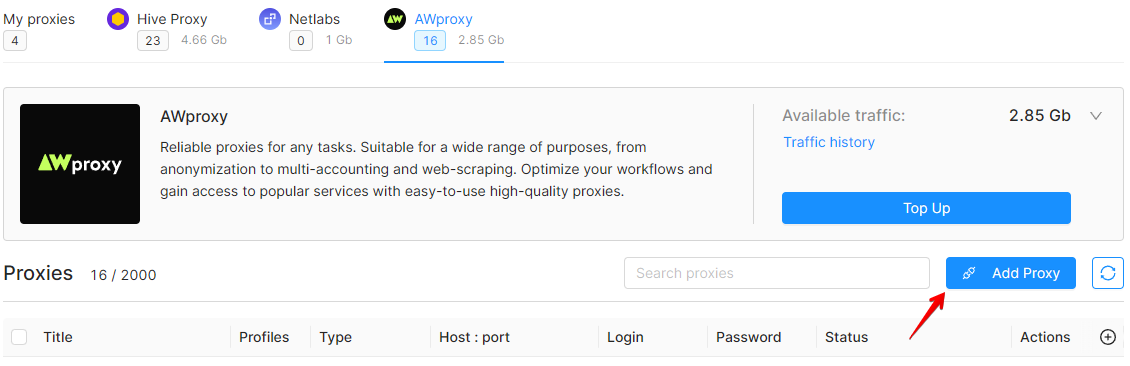
- Click on the "New Proxy" button in the "Proxies" section.
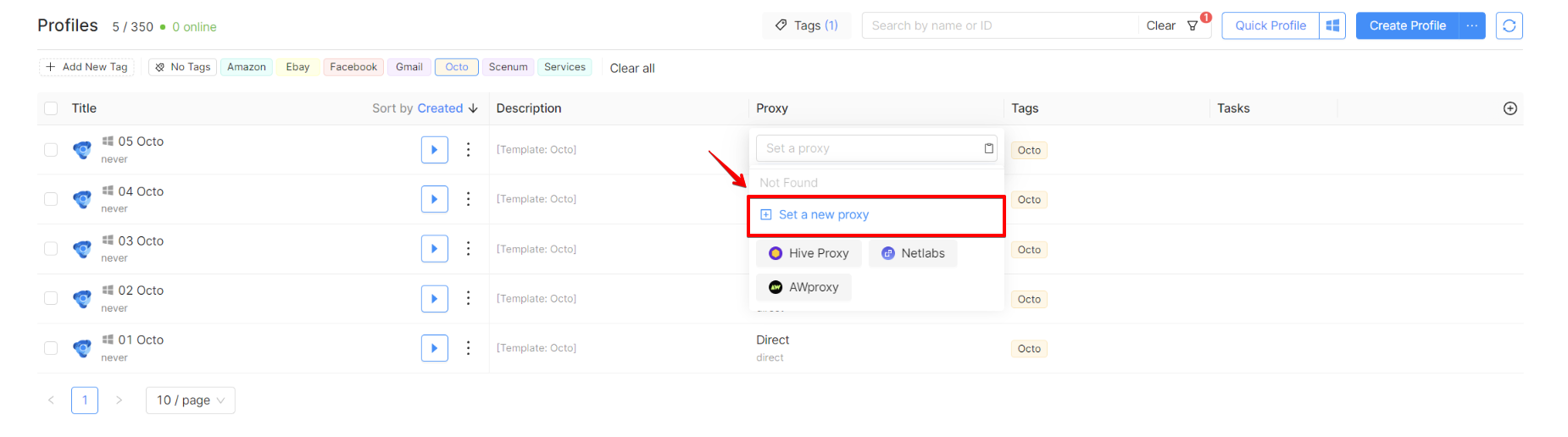
- Click on the proxy field in the corresponding row of the Profile List and click the "Set a new proxy" button.
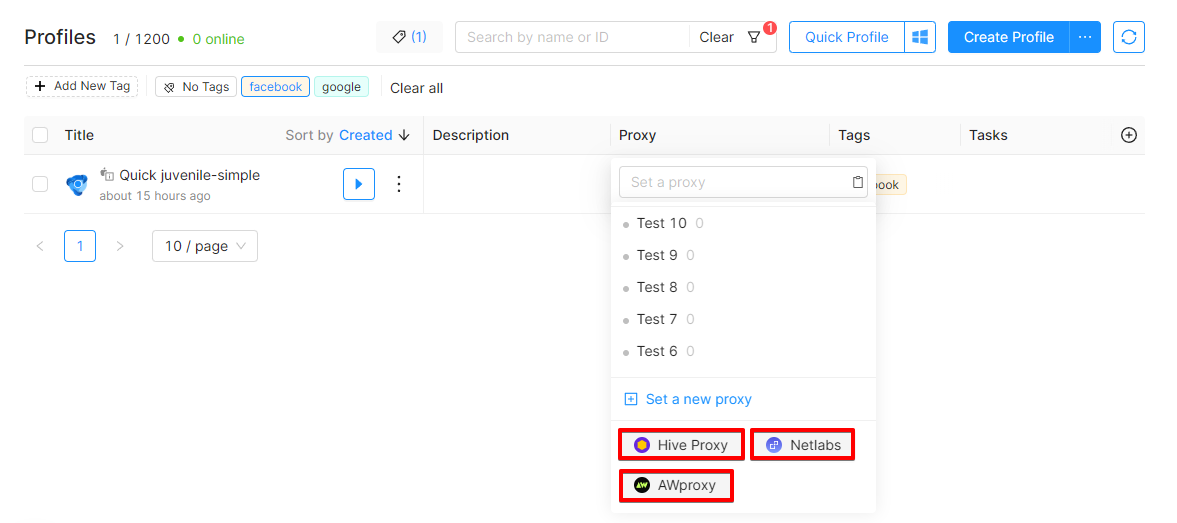
- Click on the proxy field in the corresponding row of the Profile List and click the internal provider button.
Select the proxy type, country, carrier (for mobile proxies), area/region, and city. Click "Confirm."
IMPORTANT!
Available traffic is required to create a proxy.
The same password is used for all proxies of the same provider, which is important to keep in mind when transferring access rights to proxies. Currently, changing proxy authorization data is available only by request to Customer Service.
You can review the traffic usage history by clicking the "Traffic history" button.

Proxy Shop via API
You can interact with the Proxy Shop via the API. The following actions are available:
- obtaining a list of proxies for each provider;
- creating a proxy, renaming it, and deleting it;
- checking the provider's available locations;
- checking the traffic balance.
To work with the Proxy Shop via the API, enable the “Create paid proxies” permission for the token, just as you would for a team member. For more information, please see the API Tokens section.
If you still have questions, visit the Proxy Shop FAQ page to consult the frequently asked questions and answers.